
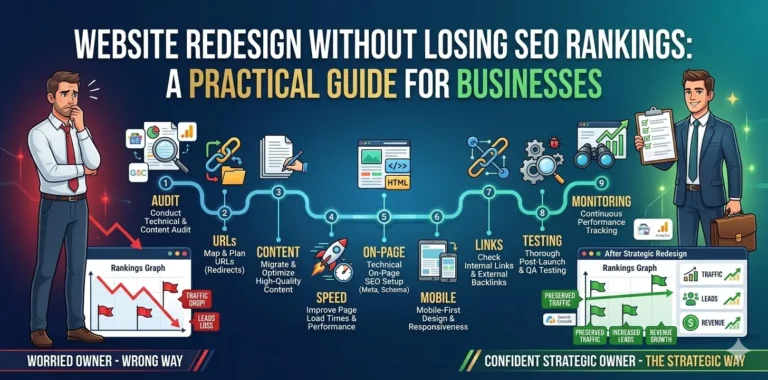
Website Redesign Without Losing SEO Rankings: A Practical Guide for Businesses
Redesigning a website sounds exciting until traffic suddenly drops, rankings disappear, and leads slow down.
I’ve seen this happen more times than it should.
A business invests in a fresh new design, launches the updated website, and then realizes their old pages were actually doing heavy SEO work behind the scenes. Without proper planning, a redesign can accidentally wipe out years of search visibility.
The good news is that a redesign does not have to hurt your rankings.
With the right strategy, you can improve your website’s design, speed, user experience, and conversions while preserving or even improving your SEO performance.
In this guide, I’ll walk through the practical steps I follow during website redesign projects to avoid SEO disasters and maintain search visibility.
Why Website Redesigns Often Hurt SEO
Most redesign projects focus heavily on visuals while ignoring technical SEO.
Common mistakes include:
- Changing URLs without redirects
- Removing indexed pages
- Deleting content that was ranking
- Slowing down the website with heavy design elements
- Breaking internal links
- Losing metadata during migration
- Ignoring mobile optimization
- Changing site structure without SEO planning
Search engines treat website structure and content seriously. Even small technical mistakes can affect rankings.
That’s why SEO should be part of the redesign process from day one, not something added after launch.
If you’re planning an SEO-friendly website redesign, it’s important to balance both design and technical performance together.
Step 1: Audit Your Existing Website Before Redesigning
Before changing anything, understand what is already working.
This is one of the most important steps.
Audit:
- Top-performing pages
- Ranking keywords
- Organic traffic sources
- Backlinks
- Internal linking structure
- Indexed pages
- Meta titles and descriptions
- Existing redirects
Useful tools:
If a page is already ranking well, preserve its SEO value carefully.
You can also perform a detailed technical SEO audit before redesigning the site.
Step 2: Keep Important URLs Intact Whenever Possible
One of the biggest SEO mistakes during redesigns is changing URLs unnecessarily.
Bad example:
/services/web-design`
Changed to:
/our-solutions/professional-web-design-services
Cleaner URLs are fine, but changing established URLs without proper redirects can destroy rankings.
If a URL must change:
- Use permanent 301 redirects
- Redirect old URLs to the most relevant new page
- Avoid redirect chains
A proper redirect strategy helps search engines transfer SEO authority to the new pages.
Step 3: Preserve High-Value Content
Many redesigns accidentally remove content that was ranking on Google.
Sometimes businesses shorten pages too aggressively for a “modern minimalist design.”
That can hurt SEO badly.
Before deleting content:
- Check if it ranks
- Check if it drives traffic
- Check if it earns backlinks
- Check if users engage with it
Instead of removing valuable content:
- Improve readability
- Update outdated information
- Restructure with headings
- Add visuals and FAQs
If you use WordPress development services, content preservation becomes much easier during redesigns and migrations.
Step 4: Improve Website Speed During the Redesign
A redesign should improve performance, not slow the website down.
Modern websites often become bloated because of:
- Large images
- Heavy animations
- Excessive plugins
- Poor-quality themes
- Unoptimized JavaScript
Performance affects:
- SEO
- user experience
- conversions
- bounce rate
Focus on:
- Image compression
- WebP images
- Lazy loading
- Optimized CSS and JavaScript
- Lightweight themes
- Proper caching
Use tools like:
A fast-loading website improves both rankings and conversions. Here’s why website performance optimization matters for modern businesses.
Step 5: Maintain Proper On-Page SEO
During redesigns, metadata often gets lost accidentally.
Always preserve:
- Meta titles
- Meta descriptions
- H1 headings
- Image alt tags
- Canonical tags
- Schema markup
Every important page should still target its primary keyword naturally.
Example:
If your page previously ranked for:
“WordPress development services”
Do not redesign the page and suddenly focus only on branding language without keyword relevance.
You should also follow Google’s official SEO Starter Guide for SEO best practices.
Step 6: Improve Mobile Experience
Google primarily uses mobile-first indexing.
That means your mobile website matters more than ever.
Check:
- Mobile responsiveness
- Font readability
- Button spacing
- Navigation usability
- Mobile loading speed
A beautiful desktop design means very little if the mobile experience is frustrating.
Businesses investing in responsive web development often see better engagement and lower bounce rates.
Step 7: Protect Internal Linking Structure
Internal links help search engines understand your website hierarchy.
During redesigns:
- important links often disappear
- navigation changes
- older pages become orphaned
Review:
- service page links
- blog-to-service links
- related articles
- footer links
- breadcrumb navigation
Strong internal linking improves:
- crawlability
- user engagement
- SEO authority distribution
You can also strengthen SEO by linking related articles like:
- Why Your WordPress Website Is Slow
- Core Web Vitals Optimization Guide
- Technical SEO Mistakes Developers Make
Step 8: Test Everything Before Launch
Never launch blindly.
Use a staging environment and test:
- redirects
- forms
- mobile responsiveness
- broken links
- metadata
- schema
- page speed
- crawlability
Run a full crawl using: Screaming Frog SEO Spider
This helps catch issues before Google indexes the redesigned website.
Step 9: Monitor Rankings After Launch
Even a well-planned redesign needs monitoring.
After launch:
- Track keyword rankings
- Monitor organic traffic
- Check indexing status
- Watch for crawl errors
- Monitor Core Web Vitals
Use:
Understanding Core Web Vitals can help identify performance issues affecting SEO and user experience.
Common SEO Mistakes During Website Redesigns
Here are the mistakes I see most often:
Launching Without Redirects
Old pages return 404 errors and rankings disappear.
Ignoring Technical SEO
Design teams focus only on visuals.
Using Heavy Themes and Plugins
The new site becomes slower than the old one.
Removing Existing Content
Useful ranking content gets deleted unnecessarily.
Changing Site Structure Completely
Search engines lose context and authority signals.
Forgetting Metadata
Titles and descriptions disappear during migration.
Can a Website Redesign Improve SEO?
Absolutely.
A properly executed redesign can:
- improve page speed
- increase conversions
- improve user engagement
- reduce bounce rate
- strengthen internal linking
- improve mobile usability
- enhance crawlability
In many cases, redesigning with SEO in mind leads to better rankings over time.
If you’re redesigning an eCommerce store, investing in WooCommerce development solutions can also improve SEO and customer experience.
Final Thoughts
A website redesign should never be treated as “just a design project.”
It is also:
- an SEO project
- a performance optimization project
- a user experience project
- a business growth project
The best redesigns preserve existing SEO strength while improving the overall user experience.
If you plan carefully, test thoroughly, and keep SEO involved throughout the process, you can redesign your website without losing rankings and often come back stronger than before.
Planning a redesign project? Feel free to contact me to discuss building a fast, SEO-friendly website that performs well in both search engines and user experience.
Frequently Asked Questions
-
Will I lose SEO if I redesign my website?
Not necessarily. If redirects, content, metadata, and technical SEO are handled properly, rankings can be preserved or improved.
-
How long does SEO recovery take after a redesign?
Minor fluctuations may stabilize within a few weeks, while larger websites may take a few months depending on crawl frequency and changes made.
-
Should I change URLs during a redesign?
Only if necessary. Keeping existing URLs is usually safer for SEO.
-
What is the biggest SEO mistake during redesigns?
Launching without a proper redirect strategy is one of the most damaging mistakes.
-
Does website speed affect SEO?
Yes. Faster websites improve user experience and can positively impact rankings and conversions.