
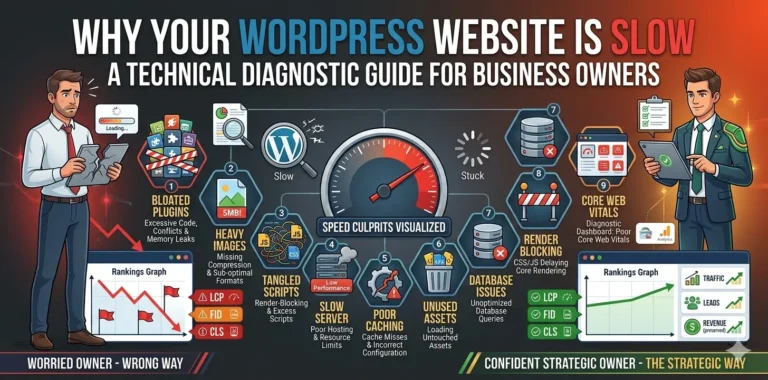
A slow WordPress website can quietly hurt your business. Visitors become frustrated, search engines struggle to crawl pages efficiently, and potential customers may leave before your website even finishes loading. While many business owners focus on design, content, and marketing, website performance often gets overlooked until traffic starts dropping or conversions begin to decline.
Over the years, I’ve worked with websites that looked fantastic but loaded painfully slowly. In most cases, the problem wasn’t WordPress itself. The real issue was poor optimization, bloated plugins, oversized images, inefficient hosting, or technical mistakes that accumulated over time.
The good news is that most WordPress performance problems can be fixed.
In this guide, we’ll explore the most common reasons WordPress websites become slow and the practical steps you can take to improve speed, user experience, and SEO performance.
Why Website Speed Matters
Website speed impacts far more than loading times.
A slow website can lead to:
- Higher bounce rates
- Lower conversion rates
- Poor user experience
- Reduced customer trust
- Lower engagement metrics
- Missed sales opportunities
- Weaker search engine visibility
Google has repeatedly emphasized the importance of page experience and Core Web Vitals as part of its broader ranking considerations.
When users wait too long for a page to load, many simply leave and visit a competitor instead.
How to Check If Your Website Is Actually Slow
Before making changes, establish a performance baseline.
I recommend testing your website using:
- Google PageSpeed Insights
- GTmetrix
- Google Search Console
- Lighthouse Performance Audits
Pay special attention to:
- Largest Contentful Paint (LCP)
- Interaction to Next Paint (INP)
- Cumulative Layout Shift (CLS)
These metrics provide valuable insight into how users experience your website.
If you’ve recently redesigned your website, you may also find my guide on Website Redesign Without Losing SEO Rankings helpful.
1. Poor Quality Hosting
Hosting is the foundation of website performance.
Even the most optimized website can struggle on low-quality hosting infrastructure.
Common hosting-related issues include:
- Shared server overload
- Slow database response times
- Limited server resources
- Poor caching configuration
- Outdated server software
Many businesses choose the cheapest hosting plan available and then wonder why their website feels sluggish.
Investing in reliable hosting is often one of the fastest ways to improve performance.
2. Too Many Plugins
One of the most common WordPress mistakes is installing plugins for every small feature.
While plugins are extremely useful, each one introduces additional code that must be loaded and processed.
Problems typically occur when:
- Multiple plugins perform the same task
- Outdated plugins remain active
- Poorly coded plugins generate excessive database queries
- Unused plugins are never removed
Instead of counting plugins, focus on quality.
A website with 30 well-optimized plugins can outperform a website with 10 poorly coded plugins.
If you’re building or maintaining a business website, professional WordPress development services can help identify performance bottlenecks before they affect users.
3. Unoptimized Images
Images are often the largest files on a website.
Uploading high-resolution images directly from a camera or design tool can dramatically increase page load times.
Common mistakes include:
- Uploading 5MB+ images
- Using PNG when WebP would work
- Missing image compression
- No lazy loading implementation
Best practices include:
- Converting images to WebP
- Compressing images before upload
- Using responsive image sizes
- Enabling lazy loading
Image optimization is one of the easiest performance wins available.
4. Heavy Themes and Page Builders
Many WordPress themes prioritize features over performance.
While modern page builders make website creation easier, they can also introduce unnecessary code.
Common issues include:
- Excessive CSS files
- Large JavaScript bundles
- Multiple font libraries
- Animation-heavy designs
- Unused assets loading site-wide
Choose themes that prioritize performance and usability rather than visual effects alone.
Remember, visitors care more about speed and functionality than flashy animations.
5. No Caching Strategy
Without caching, WordPress generates pages dynamically every time a visitor loads them.
This increases server workload and slows response times.
Caching creates pre-generated versions of pages that can be served much faster.
Benefits include:
- Faster page loads
- Reduced server usage
- Better scalability
- Improved user experience
Most business websites should have a caching strategy in place.
6. Excessive JavaScript and CSS
Many websites load resources that are not needed on every page.
Examples include:
- Slider scripts on pages without sliders
- Contact form assets site-wide
- Multiple analytics platforms
- Unused CSS frameworks
Every additional file creates extra requests and processing time.
Reducing unnecessary assets can significantly improve performance.
7. Database Bloat
Over time, WordPress databases accumulate unnecessary data.
Examples include:
- Post revisions
- Spam comments
- Expired transients
- Orphaned plugin tables
- Unused metadata
A bloated database can slow down:
- Website queries
- Admin dashboard performance
- Search functionality
- Overall responsiveness
Regular database maintenance helps keep your website running efficiently.
8. Poor Core Web Vitals Scores
Core Web Vitals measure real-world user experience.
Let’s look at the three most important metrics.
Largest Contentful Paint (LCP)
Measures how quickly the main content becomes visible.
Poor LCP is often caused by:
- Slow hosting
- Large hero images
- Render-blocking resources
Interaction to Next Paint (INP)
Measures how responsive a page feels when users interact with it.
Poor INP is commonly caused by:
- Heavy JavaScript
- Third-party scripts
- Excessive browser processing
Cumulative Layout Shift (CLS)
Measures visual stability.
Common causes include:
- Missing image dimensions
- Dynamically injected content
- Improper font loading
Improving these metrics benefits both users and search engines.
Businesses looking to improve rankings should also consider broader technical SEO improvements alongside performance optimization.
9. Too Many Third-Party Scripts
Many websites rely on external services such as:
- Analytics tools
- Chat widgets
- Marketing automation platforms
- Social media embeds
- Advertising networks
While these tools can provide value, they also increase page weight and loading times.
Audit your third-party scripts regularly and remove anything that no longer serves a clear business purpose.
10. Lack of Ongoing Performance Monitoring
Website optimization isn’t a one-time project.
Performance should be monitored continuously.
Track:
- Core Web Vitals
- Page speed scores
- Server response times
- Database performance
- User engagement metrics
Using tools like PageSpeed Insights and Google Search Console can help identify issues before they become serious problems.
Practical WordPress Speed Optimization Checklist
If your WordPress website feels slow, start with these improvements:
✅ Upgrade hosting if necessary
✅ Compress and optimize images
✅ Convert images to WebP
✅ Implement page caching
✅ Remove unnecessary plugins
✅ Minify CSS and JavaScript
✅ Enable lazy loading
✅ Optimize your database
✅ Reduce third-party scripts
✅ Monitor Core Web Vitals regularly
These changes alone can produce noticeable improvements.
How Website Speed Affects SEO
Website speed influences multiple SEO factors.
A faster website can help:
- Improve user engagement
- Reduce bounce rates
- Increase time on site
- Improve crawl efficiency
- Enhance user experience signals
While speed alone won’t guarantee top rankings, it removes a major obstacle that often prevents websites from performing at their full potential.
Businesses focused on growth should combine speed improvements with a broader website performance optimization strategy to maximize results.
Real-World Perspective
One pattern I’ve noticed repeatedly is that website owners often assume WordPress itself is the problem.
In reality, WordPress is capable of delivering excellent performance when configured correctly.
Most speed issues stem from:
- Poor hosting decisions
- Excessive plugins
- Unoptimized media
- Lack of maintenance
- Technical SEO neglect
Addressing these areas often leads to dramatic improvements without rebuilding the website from scratch.
Final Thoughts
- A slow WordPress website is usually the result of several small inefficiencies working together.
- Fortunately, most performance issues are fixable.
- By improving hosting, optimizing images, reducing unnecessary assets, implementing caching, and monitoring Core Web Vitals, you can create a faster website that delivers a better experience for users and search engines alike.
- Performance optimization is not just about speed.
- It’s about creating a website that generates more traffic, more engagement, and ultimately more business.
- If you’re struggling with a slow WordPress website and need expert guidance, feel free to get in touch with us to discuss your project.
Frequently Asked Questions
- Why is my WordPress website loading slowly?
The most common causes include poor hosting, large images, excessive plugins, database bloat, lack of caching, and unoptimized JavaScript or CSS files.
- How fast should a WordPress website load?
Ideally, a website should load within 2 to 3 seconds while meeting Google’s Core Web Vitals recommendations.
- Do plugins slow down WordPress?
Not necessarily. Well-coded plugins have minimal impact, but excessive or poorly optimized plugins can significantly affect performance.
- Does website speed affect SEO?
Yes. Website speed influences user experience, Core Web Vitals, crawl efficiency, and can indirectly impact search engine rankings.
- What is the best way to improve WordPress speed?
Start by optimizing images, implementing caching, upgrading hosting if necessary, removing unnecessary plugins, and monitoring Core Web Vitals regularly.