
Core Web Vitals Explained for Business Owners: Why They Matter for Your Website’s Success
Your website might look fantastic, but if it loads slowly, feels unresponsive, or elements jump around while visitors are trying to interact with it, you’re likely losing customers without even realizing it.
Many business owners invest thousands into designing a beautiful website but overlook one of the most important aspects of modern web performance: Core Web Vitals. If you’re planning a redesign, it’s equally important to preserve your search visibility. Learn how in my guide on Website Redesign Without Losing SEO Rankings.
Core Web Vitals are a set of performance metrics introduced by Google to measure how users actually experience your website. They don’t just influence user satisfaction. They also help identify issues that can impact search visibility, engagement, and conversions.
The good news is that you don’t need to be a developer to understand them.
In this guide, I’ll explain what Core Web Vitals are, why they matter, how to measure them, and practical ways to improve them.
What Are Core Web Vitals?
Core Web Vitals are Google’s way of measuring the real-world experience visitors have when using your website.
They focus on three key areas:
- Loading Performance
- Interactivity
- Visual Stability
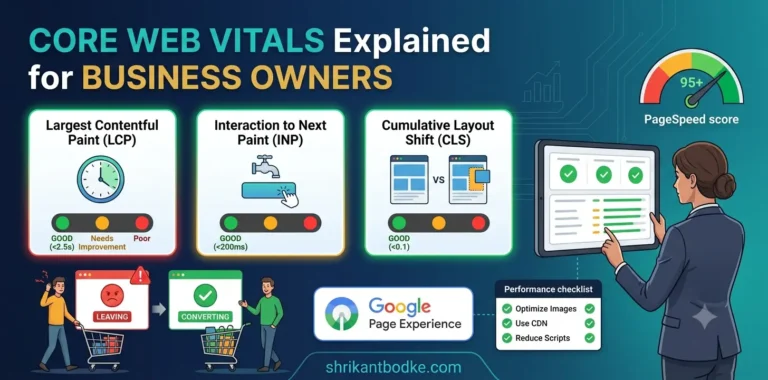
These are measured using three metrics:
- Largest Contentful Paint (LCP)
- Interaction to Next Paint (INP)
- Cumulative Layout Shift (CLS)
Unlike traditional speed tests, these metrics reflect how actual users experience your website across different devices and network conditions.
Why Should Business Owners Care?
Many people think website performance only matters for developers.
It doesn’t.
A slow website can directly impact your business by causing:
- Higher bounce rates
- Lower enquiry submissions
- Reduced online sales
- Poorer user experience
- Lower customer trust
- Reduced organic visibility
Imagine walking into a shop where the doors take ten seconds to open.
Most customers would simply leave.
Your website works exactly the same way.
If you’re already experiencing slow loading times, poor user engagement, or declining search performance, your website may have deeper performance issues. My article Why Your WordPress Website Is Slow (And How to Fix It) explains the most common causes and practical solutions.
1. Largest Contentful Paint (LCP)
What Is LCP?
Largest Contentful Paint measures how quickly the main content of a page becomes visible.
Usually this is:
- Hero image
- Banner
- Main heading
- Featured image
Google recommends:
✅ Under 2.5 seconds
Common Causes of Poor LCP
- Slow web hosting
- Large images
- Render-blocking CSS
- Heavy JavaScript
- No caching
How to Improve LCP
- Upgrade hosting
- Compress images
- Convert images to WebP
- Enable page caching
- Reduce unnecessary CSS and JavaScript
2. Interaction to Next Paint (INP)
What Is INP?
Interaction to Next Paint measures how quickly your website responds after a visitor clicks, taps, or types.
Examples include:
- Clicking a button
- Opening a menu
- Submitting a form
- Adding a product to the cart
Google recommends:
✅ Under 200 milliseconds
What Causes Poor INP?
- Too much JavaScript
- Slow browser processing
- Heavy third-party scripts
- Poor code optimization
How to Improve INP
- Reduce JavaScript execution
- Remove unnecessary plugins
- Delay non-essential scripts
- Optimize third-party tools
3. Cumulative Layout Shift (CLS)
What Is CLS?
CLS measures visual stability.
Have you ever tried clicking a button only for the page to suddenly move?
That’s layout shift.
Google recommends:
✅ Less than 0.1
Common Causes
- Images without dimensions
- Ads loading late
- Dynamic content
- Fonts swapping after page load
How to Improve CLS
- Define image sizes
- Reserve space for advertisements
- Preload fonts
- Avoid injecting content above existing elements
How to Measure Core Web Vitals
Fortunately, Google provides free tools.
I regularly use:
- Google PageSpeed Insights
- Google Search Console
- Chrome Lighthouse
- GTmetrix
These tools highlight issues affecting your website and suggest improvements.
These tools only tell you what is wrong. Understanding why these issues occur is equally important. In my article 10 Technical SEO Mistakes Developers Still Make in 2026, I cover the most common development mistakes that negatively impact website performance and SEO.
Why Core Web Vitals Affect SEO
Google has confirmed that page experience is one of many ranking signals.
Core Web Vitals alone won’t push your website to the top of search results.
However, they can become a deciding factor when several websites offer similarly valuable content.
Improving these metrics often leads to:
- Better user engagement
- Lower bounce rates
- Faster loading pages
- Higher customer satisfaction
- Improved conversion rates
Website speed is only one part of technical SEO.
Website performance is only one part of technical SEO. Search engines also evaluate crawlability, structured data, redirects, internal linking, and indexing. If you’d like to understand the bigger picture, read Wildest Dreams of Rankings? Avoid These 5 SEO Mistakes.
Common Core Web Vitals Mistakes
During website audits, I frequently find these issues:
- Oversized Hero Images
Large homepage banners often exceed 2MB.
- Too Many Plugins
Each plugin can introduce additional CSS, JavaScript, and database queries.
- Excessive Third-Party Scripts
Chat widgets, marketing tools, analytics platforms, and social media embeds all affect performance.
- Poor Hosting
No amount of optimization can completely compensate for slow hosting.
- No Image Optimization
Uploading high-resolution images without compression significantly slows websites.
Practical Checklist for Better Core Web Vitals
If you want to improve your website’s performance, start with these steps:
✅ Compress all images
✅ Convert images to WebP
✅ Enable browser caching
✅ Use a Content Delivery Network (CDN)
✅ Remove unnecessary plugins
✅ Optimize CSS and JavaScript
✅ Upgrade hosting if required
✅ Monitor Core Web Vitals monthly
Many of these improvements overlap with WordPress performance optimization. If you’re using WordPress, my guide on Why Web Performance Matters and How You Can Make Your Site Faster walks through these optimizations step by step.
Real Business Impact
Core Web Vitals aren’t just technical numbers.
Improving them can help businesses:
- Increase enquiries
- Improve lead generation
- Reduce bounce rates
- Encourage visitors to stay longer
- Increase online sales
- Build greater customer trust
Performance improvements often produce measurable business results without increasing advertising spend. Performance improvements are often easiest to implement during a website redesign. If you’re planning to rebuild or modernize your website, make sure you don’t lose your existing rankings by following my guide on Website Redesign Without Losing SEO Rankings.
Do Core Web Vitals Matter for WordPress?
Absolutely.
WordPress websites often struggle because of:
- Heavy page builders
- Too many plugins
- Large images
- Poor hosting
- Lack of caching
Fortunately, these issues can usually be fixed without rebuilding the website.
WordPress websites can achieve excellent Core Web Vitals with proper optimization. If your site is loading slowly, start with my detailed guide Why Your WordPress Website Is Slow (And How to Fix It), where I explain the biggest performance bottlenecks and how to fix them.
Final Thoughts
Core Web Vitals aren’t just for developers.
They help business owners understand whether their website provides a fast, responsive, and enjoyable experience for visitors.
Improving these metrics won’t magically guarantee first-page rankings.
However, when combined with quality content, technical SEO, and strong user experience, they create a solid foundation for long-term online success.
If you’re unsure how your website performs, it’s worth running a Core Web Vitals audit before making design or marketing decisions.
Need help improving your website’s performance? Explore my web development and SEO services or get in touch for a professional website performance review.
Frequently Asked Questions
– What are Core Web Vitals?
Core Web Vitals are Google’s user experience metrics that measure loading speed, responsiveness, and visual stability using LCP, INP, and CLS.
– Do Core Web Vitals affect SEO?
Yes. While they are only one of many ranking signals, good Core Web Vitals contribute to a better user experience, which can positively influence search performance.
– What is a good Core Web Vitals score?
Google recommends:
- LCP: Under 2.5 seconds
- INP: Under 200 milliseconds
- CLS: Below 0.1
– How can I improve Core Web Vitals?
Optimize images, reduce JavaScript, enable caching, improve hosting, compress assets, and regularly monitor performance using Google’s free tools.
– Can WordPress websites achieve good Core Web Vitals?
Yes. With proper optimization, quality hosting, image compression, caching, and efficient coding, WordPress websites can easily meet Google’s recommended thresholds.